L'installation de MariaDB se distingue par l'installation de la partie serveur appelée mariadb-server et la partie cliente nommée mariadb-client.
sudo apt install mariadb-client mariadb-serverSécuriser l'installation avec la commande suivante :
sudo mysql_secure_installationLes réponses à saisir sont les suivantes :
Enter current password for root (enter for none):
# Par défaut ce n'est rien (none). Ne rien saisir et appuyer sur la touche Entrée

Set root password? [Y/n] =>
# Y

New password:
# Saisir un nouveau mot de passe

Re-enter new password:
# Saisir un nouveau mot de passe

Remove anonymous users? [Y/n]
# Y

Disallow root login remotely? [Y/n]
# Y

Remove test database and access to it? [Y/n]
# Y

Reload privilege tables now? [Y/n]
# Y
Vérifier que le service soit opérationnel
Vous pouvez vérifier le bon fonctionnement de votre service en tapant la commande suivante :
sudo systemctl status mariadb
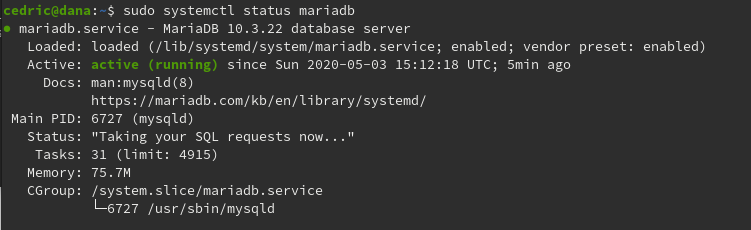
Vérifier la connectivité avec root
Vous pouvez vérifier en ligne de commande le service :
mysql -uroot -p
Résultat :
Welcome to the MySQL monitor.  Commands end with ; or \g.
Your MySQL connection id is 43
Server version: 5.5.55-0+deb8u1 (Debian)

Copyright (c) 2000, 2017, Oracle and/or its affiliates. All rights reserved.

Oracle is a registered trademark of Oracle Corporation and/or its
affiliates. Other names may be trademarks of their respective
owners.

Type 'help;' or '\h' for help. Type '\c' to clear the current input statement.

mysql>
Si vous n'arrivez pas à vous connecter, suivant le guide
Une fois connecté tapez la commande :
SHOW DATABASES;Vous obtiendrez le résultat suivant :
+--------------------+
| Database |
+--------------------+
| information_schema |
| --- |
| mysql |
| performance_schema |
+--------------------+
3 rows in set (0.00 sec)
voir aussi
Installation d’un serveur MariaDB ou MySQL en une ligne de commande sous Linux Debian
Commentaires
Aucun commentaire pour l'instant. Soyez le premier !
Laisser un commentaire